Instagram Font Generator – Copy & Paste Fonts for Bio & Captions
Create aesthetic, cursive, bold, and stylish fonts for your Instagram bio, captions, and stories. 150+ styles. Instant copy & paste. No app needed.
Instagram Font Generator – Create Stylish Fonts for Instagram Bio, Captions & Stories (2026 Guide)
Transform your Instagram profile with custom fonts that make you stand out in just minutes.
What Is an Instagram Font Generator?
An Instagram font generator turns regular text into fancy Unicode characters. It doesn't change your phone's actual font. Instead, it makes your text look different using special symbols.
Like this:
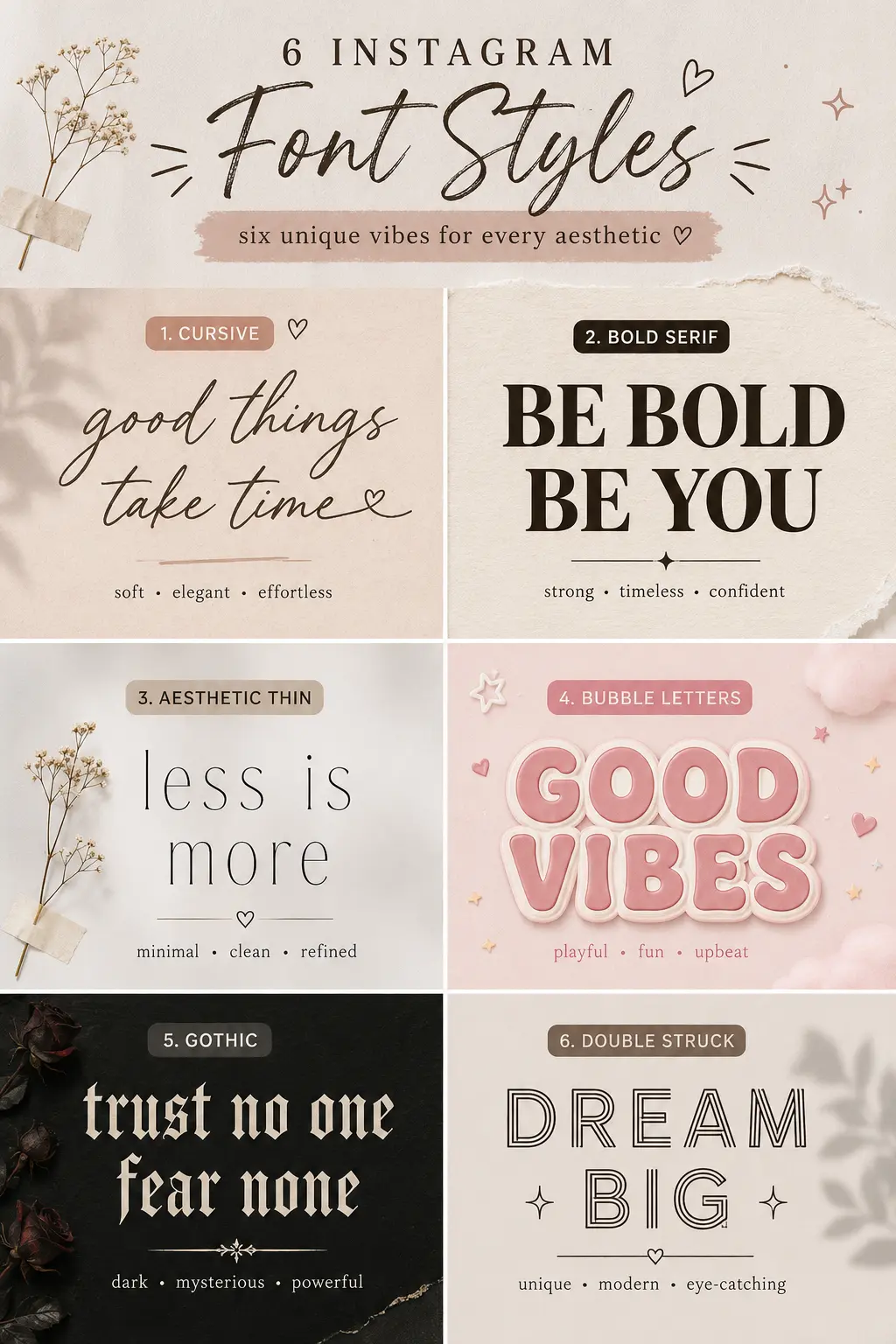
These work everywhere on Instagram:
- Bio section
- Username (watch the character count)
- Display Name
- Captions
- Stories
- Comments
- Highlights
Unlike images, these fonts stay searchable. You can select and copy them. Nice.
How Do Instagram Fonts Work?
People often think Instagram has secret fonts.
It doesn't.
Instagram uses the Unicode Standard. This system has over 149,000 characters from writing systems worldwide. Mathematical symbols. Decorative letters. All sorts of text styles.
Instagram font generators just map regular letters like:
A → 𝐀
B → 𝔅
C → 𝓒
That's why these styles work almost everywhere online. Not just Instagram. Clever, right?
Are Instagram Fonts Real Fonts?
Technically? No.
They're Unicode characters.
Real fonts change how text renders. Unicode text generators replace each letter with another Unicode character that looks different.
That's why:
✅ No app installation needed
✅ Works on Android
✅ Works on iPhone
✅ Works on Windows
✅ Works on Mac
✅ Works on most social media platforms
Why Use Fancy Instagram Fonts?
Instagram is all about visuals.
You get maybe three seconds to impress someone visiting your profile.
Stylish fonts can help:
- Pop up in search results
- Make your bio memorable
- Highlight important stuff
- Strengthen your personal brand
- Match your aesthetic
- Get more engagement
For influencers, creators, gamers, artists, musicians, photographers, and businesses—a well-designed bio creates a stronger first impression. Really.
Benefits of Using Stylish Instagram Fonts
Improve Profile Appearance
A clean, attractive bio looks more professional. Simple.
Increase Readability
Bold fonts help emphasize important information like:
- Contact details
- Offers
- Website links
Match Your Brand
Luxury brands often use serif styles.
Gaming creators prefer gothic fonts.
Lifestyle creators love cursive fonts.
Minimal creators often choose monospace styles.
How to Use an Instagram Font Generator
This takes less than a minute. Seriously.
Step 1
Enter your text.
Example:
Travel With Alex
Step 2
Browse hundreds of font styles generated instantly.
Step 3
Click your favorite style.
The text copies automatically. Which is convenient.
Step 4
Open Instagram.
Go to:
Profile → Edit Profile
Step 5
Paste your stylish text into:
- Bio
- Name
- Caption
- Story
Save your profile.
Done.
Best Instagram Font Styles
1. Bold
𝐈𝐧𝐬𝐭𝐚𝐠𝐫𝐚𝐦
Perfect for creators and businesses.
2. Cursive
𝓘𝓷𝓼𝓽𝓪𝓰𝓻𝓪𝓶
Ideal for beauty and lifestyle accounts.
3. Double Struck
𝕀𝕟𝕤𝕥𝕒𝕘𝕣𝕒𝕞
Clean and modern.
4. Gothic
𝕴𝖓𝖘𝖙𝖆𝖌𝖗𝖆𝖒
Popular among gaming and music creators.
5. Bubble
Ⓘⓝⓢⓣⓐⓖⓡⓐⓜ
Cute and playful.
6. Monospace
𝙸𝚗𝚜𝚝𝚊𝚐𝚛𝚊𝚖
Minimal aesthetic.
Best Fonts for Instagram Bio
If you want people to actually read your bio, choose:
- Bold Serif
- Sans Bold
- Monospace
- Small Caps
Avoid using decorative fonts for your entire bio. They become hard to read. Trust me.
Best Fonts for Usernames
Instagram usernames have stricter character support.
Recommended styles:
- Bold
- Mathematical Sans
- Double Struck
Avoid overly decorative symbols. They might not show up right everywhere.
Best Fonts for Captions
Captions need to be readable.
Good choices include:
- Bold
- Italic
- Small Caps
Save fancy fonts for headings or key phrases instead of the whole caption.
Instagram Bio Ideas
Fitness Coach
💪 Helping Busy Professionals Stay Fit
👇 Free Workout Guide
Travel Creator
✈️ Exploring Hidden Places
📸 New Adventures Weekly
Business
🚀 Digital Marketing Expert
📩 DM for Collaboration
Unicode Characters Explained
Unicode is the international standard for representing text digitally.
Every symbol has its own code point.
For example:
A
𝐀
𝒜
𝔄
𝕬
They look different, but each is a unique Unicode character. Fascinating, isn't it?
Why Some Instagram Fonts Don't Work
Sometimes, certain Unicode styles might not show up right because:
- The character isn't supported by Instagram.
- An older Android or iOS version lacks Unicode support.
- The receiving device has outdated fonts.
- Some rare Unicode symbols get filtered out.
If a style looks weird, try a more common bold, italic, or serif variation.
How to Fix Instagram Font Problems
If your stylish text isn't displaying correctly:
- Refresh the page and generate the text again.
- Use a simpler Unicode font style.
- Update Instagram to the latest version.
- Update your device's operating system.
- Don't combine multiple decorative fonts in the same sentence.
- Remove unsupported emojis or special symbols if they mess up the display.
Are Instagram Font Generators Safe?
Yes, reputable Instagram font generators are generally safe because they just convert text into Unicode characters in your browser.
A trustworthy tool should:
- Not need your Instagram login.
- Not ask for your password.
- Work entirely through copy and paste.
- Not collect unnecessary personal information.
If a site wants your Instagram credentials just to generate fonts, run. Don't walk away.
Best Mobile Apps for Instagram Fonts
If you want to generate stylish text directly on your phone, these apps are widely used:
Android
- Fonts Art
- Stylish Text
- Cool Fonts
iPhone
- Fonts
- Font Keyboard
- Better Fonts
These apps integrate with your keyboard, letting you type fancy Unicode text in many apps, including Instagram. Handy.
Real-World Examples
Many successful Instagram profiles use subtle typography to reinforce their branding:
- A fitness coach might bold their profession while keeping the rest of the bio simple.
- A travel creator may use elegant cursive for their display name to match an aesthetic feed.
- A gaming creator often combines gothic text with gaming-related symbols.
- A small business can emphasize offers or contact information with bold Unicode text, making key details easier to spot.
The common pattern? Moderation. Profiles that use one consistent style look more professional than those mixing many decorative fonts.
Common Mistakes
Avoid these mistakes:
❌ Using five different font styles in one bio
❌ Making every caption fancy
❌ Adding too many symbols
❌ Copying unreadable Unicode text
❌ Ignoring accessibility
Pro Tips
- Use only one or two font styles.
- Keep your bio under 150 characters.
- Add line breaks for better readability.
- Combine fonts with emojis sparingly.
- Make your call-to-action stand out using bold text.
- Test how your profile looks on both Android and iPhone.
Frequently Asked Questions
Your Instagram profile now speaks with a unique visual style that helps you stand out while remaining readable across modern devices. Choose fonts that match your personality, keep important information easy to read, and avoid overusing decorative characters for the best user experience.