Pro Rainbow Text Generator
Rainbow Word Art Generator
To create rainbow text, you can use a combination of HTML and CSS. Here is an example of how you can create rainbow text using these technologies:
Colour does not survive a copy and paste, so save the image from this page, or use the png text generator when you need the same words as a transparent file.
- Start by creating an HTML file and adding the following code to it:
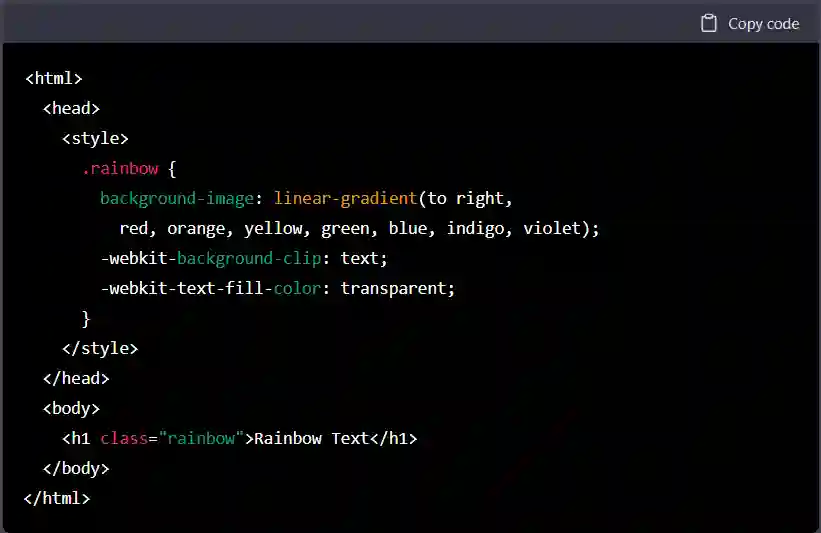 Rainbow Text Generator
- Save the file and open it in a web browser. You should see the text "Rainbow Text" displayed in a rainbow of colors.
This code uses the linear-gradient function in CSS to create a gradient that transitions from red to violet. The -webkit-background-clip and -webkit-text-fill-color properties are used to apply the gradient to the text.
You can customize the text and the colors used in the gradient by changing the values in the CSS code. For example, you could use a different set of colors or apply the gradient to different elements on the page.
Rainbow Text Generator
Produces text with a colour gradient running through it, as an image you can download and use. It works differently from every other generator on this site, and the difference matters: colour is not part of Unicode, so coloured text cannot be produced as characters you copy and paste.
How to use it
- Type your text in the box above.
- Adjust the colours and style until it looks right.
- Download the image and use it wherever you need it.
Why it has to be an image
Every other style here works by swapping your letters for different Unicode characters that happen to look styled. Unicode encodes which character something is, never what colour it is — colour comes from CSS on a web page, or from the app doing the rendering.
So anywhere that gives you no formatting controls, such as a social bio, coloured text is only possible as a picture. That is a real constraint rather than a limitation of this tool, and any site promising copy-paste rainbow text is promising something the format cannot do.
Where to use the image
- Thumbnails and banners for videos, streams and channel art.
- Story and post graphics where a picture is expected anyway.
- Logos and headers for a page, a server or a document.
- Not body text. An image of text cannot be selected, searched, translated or read by a screen reader.
Accessibility, honestly
Text in an image is invisible to assistive technology and to search engines. If you
use one on a web page, put the same words in the alt attribute, and
never let an image carry information that appears nowhere else. Gradients also tend
to have poor contrast at the light end of the ramp, which makes them hard to read
for anyone with low vision.
For text you can actually paste, the font generator covers the styles Unicode can express. For more image-based text effects, see the PNG text generator and the gradient text PNG tool.